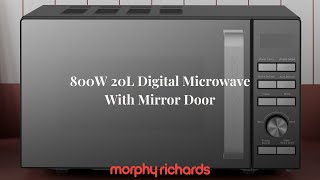
Get precision cooking at your fingertips. This microwave offers 6 power levels, auto defrost, and multistage cooking for effortless meals in minutes.
Equipped with a clear digital display, the Morphy Richards Digital Microwave 20L gives you easy control. The multistage cooking function helps you prep more efficiently, especially for meals that need varied settings in one go.
Specification
Benefits & Features
• A 20-litre capacity provides ample space for standard-sized dinner plates and is suitable for small families or individuals.
• An 800-watt power output delivers quick and efficient heating for a variety of food items.
• A digital display and controls offer an easy and precise way to set cooking times and power levels.
• A choice of multiple power levels allows for cooking different types of food with varying intensity, with some models offering five or ten levels.
• There are typically eight pre-set auto-menus for common foods such as pizza, chicken, meat, vegetables, fish, pasta, soup, and porridge, which automate cooking time and power.
• A defrost function is included, with options to defrost by either weight or time for convenient thawing of frozen food.
• A child safety lock feature is present on the control panel to prevent accidental operation.
• A 95-minute cooking timer is available for setting longer cooking durations.
• A cooking end signal alerts when the cooking cycle is complete.
• A glass turntable ensures food is cooked evenly and can be removed for easy cleaning.
• The design features a stainless steel finish, providing a stylish and modern appearance for the kitchen countertop.
Usage Instructions
• Place the microwave on a flat, stable, and heat-resistant surface. Ensure adequate space around the appliance for ventilation, leaving a minimum of 20cm at the back and sides, and 30cm above. Do not block the air openings.
• Ensure the turntable, roller ring, and shaft are correctly positioned inside the microwave cavity before operation. Do not operate the microwave without these components in place.
• To set the clock, press the "CLOCK" button once in standby mode. Use the number keys or the dial to enter the current time. Press the "CLOCK" button again to confirm the setting. The colon will flash, indicating the clock is active.
• For microwave cooking, place the food in a microwave-safe container on the glass turntable. Close the door securely. Select the desired cooking time and power level using the controls. The appliance features multiple power levels and a rotary dial or number keys for setting the time.
• The appliance features pre-set cooking programmes for various food items such as pizza, chicken, meat, and vegetables. To use these, select the appropriate pre-set programme and follow the instructions to input the weight or quantity of the food. The microwave will automatically set the time and power level.
• To defrost food, use the weight defrost or time defrost functions. For weight defrost, select the function and input the weight of the frozen food. The microwave will calculate the defrosting time automatically. For time defrost, simply set the desired defrosting duration.
• A child safety lock is available to prevent accidental use. To activate, press and hold the designated button for a few seconds until an indicator appears on the display. To deactivate, repeat the same action.
• After cooking is complete, the microwave will emit a series of beeps. Open the door to remove the food. Always use caution, as the food and container may be hot. The interior light will illuminate when the door is open.
• To stop or pause a cooking programme, press the "STOP/CLEAR" button once. Press the "START/+30SEC." button to resume cooking. Pressing "STOP/CLEAR" twice will cancel the entire programme.
• Wipe down the interior of the microwave after each use to remove any condensation or food debris. Use warm, soapy water and a soft cloth, avoiding abrasive cleaners. A cleaning tip involves heating a bowl of water with lemon juice to loosen food residue for easier cleaning.
• If the microwave stops working, first check the plug and the fuse. Unplug the microwave from the mains socket, wait for 10 seconds, then plug it back in. This may reset the internal microcomputer.
Operating Voltage
220-240V
Model Number
P70H20EL-ZWA
Interface
Digital
Warnings
• For safe operation, never place metal objects inside the microwave and only use approved cookware.
• Always check that the door is securely closed before use.
• Use care when handling heated items, as they can be very hot.
• This appliance is not intended for use by children without supervision.