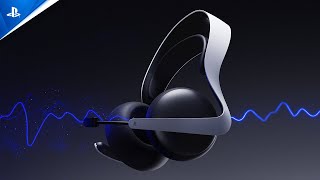
Enter a new era in gaming audio with the PULSE Elite Wireless Headset. Enjoy lifelike sound with planar magnetic drivers and a lightning-fast, lossless PlayStation Link wireless connection.
Enter a new era in gaming audio with the PULSE Elite™ wireless headset. Enjoy extraordinary lifelike sound in your favorite games with planar magnetic drivers, and hear every detail with a lossless and lightning-fast PlayStation Link™ wireless connection. Designed for serious gamers, the PULSE Elite delivers ultra-low latency audio and immersive spatial sound that elevates every gameplay moment. AI-enhanced noise rejection ensures crystal-clear communication, while the retractable microphone and included charging hanger make storage and use seamless. Whether you're in a high-stakes match or exploring open worlds, the PULSE Elite offers professional-grade performance, comfort, and convenience.
Specification
Benefits & Features
Planar Magnetic Drivers: Studio-inspired drivers reproduce accurate sound across the entire spectrum with ultra-low distortion, delivering rich detail and clear deep bass.
PlayStation Link Technology: Enjoy a lossless, lightning-fast, ultra-low latency wireless connection to your compatible PlayStation devices, PC, or Mac.
AI-Enhanced Noise Rejection: Microphone technology powered by artificial intelligence isolates and removes unwanted background noise for crystal clear voice chat.
Dual Device Connectivity: Simultaneously listen to audio from both a PlayStation Link device and a Bluetooth device to take calls or enjoy music while gaming.
Long Battery Life: Stay in play for extended gaming sessions with up to 30 hours of battery life from a single full charge.
Quick Charging Functionality: Get back into the action quickly, with up to two hours of battery life available after just a ten-minute charge.
Retractable Microphone Design: Easily position the integrated flexible boom mic for optimal voice capture, then fully retract it when not needed.
Included Charging Hanger: Conveniently charge and display the headset on your desk, tabletop, or wall with the companion charging hanger supplied.
Intuitive Controls Placement: Simple, easy-to-access buttons on the headset allow for quick adjustments to volume and mic mute without interrupting gameplay.
Usage Instructions
Initial Charging: Ensure the headset is fully charged before first use by connecting the included USB cable to a power source, noting the status indicator pulses orange while charging and turns off when complete.
Connecting To PlayStation 5 (PS Link): Insert the included PlayStation Link USB adaptor into a PS5 USB-A port, then press the PlayStation Link button on the headset to power on, and a solid light on both devices indicates a successful, out-of-the-box connection.
Pairing With New PlayStation Link Devices: Press and hold the PS Link button on the headset for approximately eight seconds until the status indicator quickly blinks blue, then press the PS Link button on the new USB adaptor to establish a connection.
Connecting Via Bluetooth: Press and hold the PS Link button for approximately eight seconds until the indicator quickly blinks blue to enter pairing mode, then select "PULSE Elite" from the Bluetooth settings on a compatible mobile device.
Dual Device Connectivity: Connect simultaneously to a PS Link device for game audio and a Bluetooth device for mobile audio, though the headset's volume button will only adjust the PS Link audio.
Adjusting Volume: Use the tactile volume button on the right earcup to raise or lower the PlayStation Link volume, feeling the raised dot on the "+" side for easier adjustment.
Microphone Use And Mute: Pull out the retractable boom microphone from the left side when needed for chat, and press the mute button on the mic boom to toggle mute, which is indicated by an orange light when active.
Accessing Sound Controls: Quickly press the PlayStation Link button three times to access a shortcut to the Sound controls in the PS5 control centre for quick setting adjustments like Equalizer and Game/Chat balance.
Customising Audio Settings: Adjust Equaliser, Sidetone volume, and 3D Audio settings through the PS5 console or the PlayStation Link PC Driver; note that Equaliser and Sidetone settings are stored directly on the headset.
Charging Hanger: Use the included charging hanger, which connects to a power source via the USB cable, for convenient storage and charging of the headset between gaming sessions.